
AWS PrivateLink provides private connectivity between VPCs and services by keeping traffic on the AWS network backbone. It works through Interface Endpoints, eliminating the need for public IPs, internet gateways, or VPC peering. As a service provider (in the PrivateLink terminology), Traversal BYOC environments expose four endpoint services: its web application, API, Edge (for the Connector), and Ingest (for the Processor). In a Traversal BYOC deployment, PrivateLink is how your VPCs reach Traversal’s endpoints without exposing them to the public internet. After deploying the VPC endpoints in your VPC(s), Traversal-supplied hostnames resolve only inside VPCs you explicitly authorize, and the wildcard server certificate is issued by your own CA against a domain you own. For an architectural overview, see Bring Your Own Cloud. You establish the connection by deploying a CloudFormation template that Traversal publishes. The template creates one VPC Interface Endpoint per service; you supply your own security groups and they are attached per endpoint, giving you independent access control per service. Each security group must allow inbound HTTPS (port 443) from the CIDR ranges or sources that need to reach that service. Each endpoint resolves a Traversal-supplied hostname to a private IP inside your VPC, keeping all traffic on the AWS network.Documentation Index
Fetch the complete documentation index at: https://docs.traversal.com/llms.txt
Use this file to discover all available pages before exploring further.
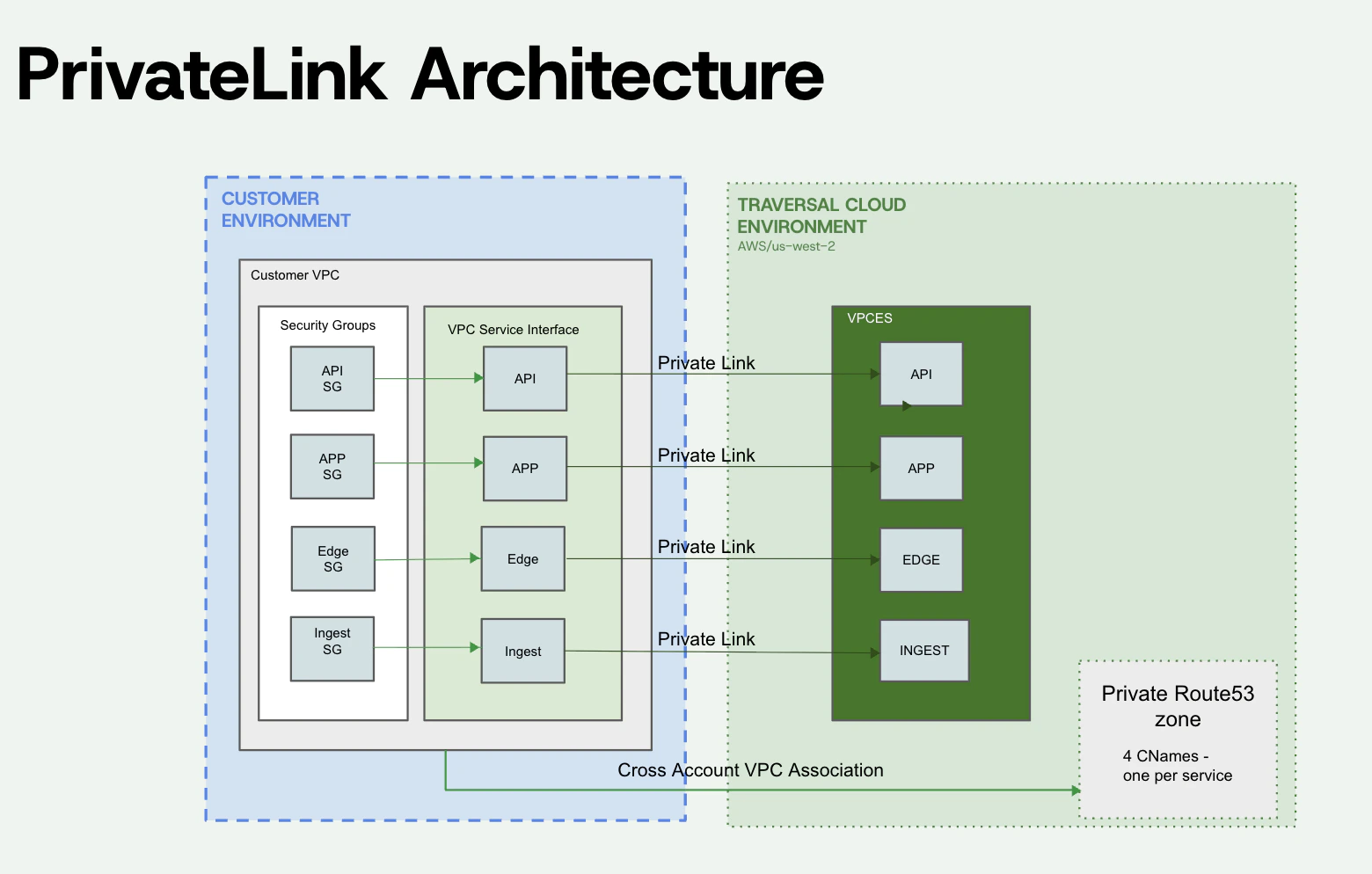
Multi-VPC access: Repeat the deployment steps in each VPC where Traversal services need to be reachable. Each VPC needs its own set of 4 Interface Endpoints and its own association with the private hosted zone.
Before you begin
Traversal shares the following with you through a secure channel during BYOC onboarding:- Endpoint Service names — one per service (
api,app,edge,ingest), in the formcom.amazonaws.vpce.<region>.vpce-svc-xxxxxxxxxxxxxxxxx. - A Route53 private hosted zone ID and its four nameservers.
- The subdomain that resolves the Traversal endpoints (for example,
traversal.<your-company>.com).
- An AWS account, and a VPC where the Interface Endpoints will live.
- Subnet IDs in that VPC (one per AZ recommended).
- The CIDR ranges of every client network that should reach the endpoints.
- A parent zone you control where you can add a delegating
NSrecord.
DNS Resolution
Traversal creates a private Route53 hosted zone for a subdomain and shares four nameservers with you. You add an NS record on your parent zone pointing at those nameservers, delegating the subdomain to Traversal. This lets Traversal use a subdomain you own, for example,traversal.<your-company>.com, so that Traversal service hostnames appear under your domain rather than a Traversal-owned one.
Traversal then populates the hosted zone with CNAME records pointing to your Interface Endpoint DNS names, which in turn resolve to the private IP of the endpoint inside your VPC. These hostnames only resolve inside VPCs that are associated with the hosted zone and are not resolvable from the public internet.
Deployment
Delegate the subdomain to Traversal
On your parent zone, add an
NS record for your delegated subdomain pointing at the four nameservers Traversal shared with you.Deploy the CloudFormation template
Deploy the PrivateLink consumer CloudFormation template (https://templates.traversal.com/traversal-privatelink-consumer.yaml) in the AWS account and region where the Interface Endpoints will live. Pass the four
*EndpointServiceName values Traversal shared with you, along with your VPC ID, subnet IDs, and the CIDR ranges of clients that should reach the endpoints.The stack outputs include one DNS name per service (ApiEndpointDnsName, AppEndpointDnsName, EdgeEndpointDnsName, IngestEndpointDnsName).Associate each authorized VPC with the private hosted zone
Share your VPC IDs and regions with Traversal. Once Traversal authorizes them, run the following from your account for each VPC:
DNS-only VPC access
If a VPC only needs to resolve Traversal hostnames but not connect directly to the endpoints — for example, an admin VPC — you can authorize it without deploying Interface Endpoints. Share the VPC IDs and regions with Traversal; we’ll authorize them on our side. Then run the following from your account for each VPC:Want to learn more?
BYOC architecture
How Traversal BYOC is deployed in your AWS account, what’s in scope, and the security boundary.
AWS PrivateLink
AWS documentation on PrivateLink, Interface Endpoints, and Endpoint Services.